Aplos review: is it worth it in 2026?
By Sankalp Jonna · Last reviewed May 2026
Aplos
Fund-accounting-first software for churches and small nonprofits, with donor management and online giving in one ledger.
Visit Aplos ↗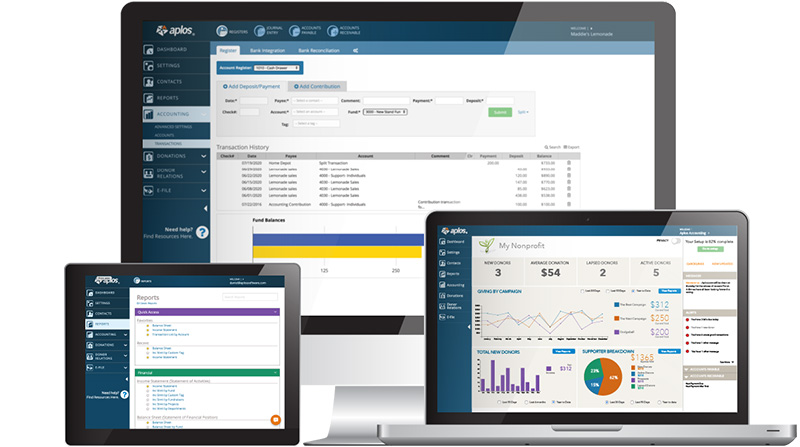
Aplos is the rare church-software product that's honest about what it is. It's an accounting system first, a donor-management system second, and a giving platform third. It is not a church management system, and the company has stopped pretending otherwise. For a treasurer who has spent years stitching QuickBooks plus a separate ChMS plus a giving processor together with a Sunday-evening spreadsheet, consolidating those three onto Aplos is a real simplification.
The honest counter-pitch is that Aplos won't run your Sunday morning. There's no check-in, no volunteer scheduling, no attendance, no app for congregants.³ If your problem is people management, Aplos isn't your answer — you want Planning Center or Breeze. If your problem is fund balances, designated gifts, and contribution statements that survive an audit, Aplos is one of the only purpose-built tools in the category and it's worth the look.
What it is
Aplos Software is a Fresno, California company founded in 2009 to build cloud-based fund accounting for churches and small nonprofits.² The product started as accounting only and has grown over the last decade into a four-pillar suite: fund accounting (the core), donor management, online giving, and a basic events / website module. The accounting engine is a real general ledger — multi-fund, multi-account, with restricted-fund balance enforcement — not a category tag bolted onto a giving report.
The defining design choice is that everything posts to one ledger. A gift made through the Aplos giving form lands as a journal entry against the right fund automatically. A contribution statement at year-end pulls from the same ledger. A board financial report in March pulls from the same ledger. For a church running QuickBooks plus Tithe.ly plus Breeze and reconciling all three monthly, the one-ledger story is the value proposition.
What Aplos doesn't do: check-in, child check-in, volunteer scheduling, attendance tracking, SMS, live streaming, or a real congregant-facing mobile app. The website builder is basic and exists mostly to host event registration and giving pages, not to compete with Squarespace. The events module handles registration with payment but isn't a worship-planning tool. None of these gaps are accidents — Aplos isn't trying to be a ChMS.
Who it’s for
Aplos is for small-to-mid churches and nonprofits whose primary software pain is bookkeeping, designated-fund tracking, and contribution statements. The classic buyer is a church treasurer or part-time bookkeeper at a 100-500-person congregation who is currently maintaining QuickBooks with a class-based fund workaround, exporting CSVs from a separate giving platform, and spending the first week of every January cleaning up donor records for tax statements. Aplos collapses that workflow into one product.
It is not the right pick for churches whose primary need is people management, volunteer scheduling, or a Sunday-morning member experience. It also isn't the right pick for very small churches — the $79/month entry tier is real money for a 40-person congregation, and the free tiers from Planning Center or ChurchTrac will go further. Larger churches with a CFO and a real audit trail requirement may also feel the limits of the Aplos ledger and want a heavier nonprofit-grade tool like Sage Intacct.
Key features
Real multi-fund general ledger with restricted-fund balance enforcement, not a class-based workaround on top of QuickBooks. The reason most accounting-first churches choose Aplos in the first place.
Aplos Giving (powered by WePay/Chase) at roughly 2.9% + $0.30 for cards and ~1% for ACH. Gifts post directly to the right fund as journal entries with no manual sync.
Donor records, household roll-ups, soft credits, and recurring gift management, all tied to the contribution ledger. Year-end statement generation is one batch operation.
IRS Form 990 prep helpers, designated-fund balance reports, board-ready financial statements, and donor acknowledgement letters that satisfy IRS substantiation rules. Built for the actual reports nonprofits file.
Paid or free event registration with capacity limits, included from the Core tier. Functional for retreats and VBS but not a worship-planning tool.
A simple site builder included primarily to host giving forms and event registration pages on your domain. Not a competitor to Squarespace; closer to a landing page tool.
Lite at $79/month for the basics, Core at ~$99 for events and budgeting, Advanced at $229 for income/expense allocations and project accounting, Enterprise quote-based for larger nonprofits.
Pros & cons
- Built around true fund accounting, which is the right architecture for churches that need to track restricted gifts, designated funds, and grant balances cleanly.
- Bundles bookkeeping, online giving, donor management, and contribution statements into one system, so small churches don't have to stitch QuickBooks plus a ChMS plus a giving platform together.
- The interface is unusually approachable for accounting software, and treasurers without an accounting background routinely report being able to run month-end without a CPA.
- Reporting is purpose-built for nonprofits, including IRS Form 990 prep helpers, designated-fund balance reports, and donor acknowledgement letters that satisfy IRS substantiation rules.
- The company has been independent and focused on nonprofits since 2009, with steady product investment rather than the feature stagnation common in church-tech.
- No child check-in, no volunteer scheduling, no attendance tracking, and no small-groups module, so it isn't a real ChMS in the Planning Center or Breeze sense.
- No live-streaming product and no first-class mobile app for congregants; the mobile experience is a thin ledger-entry app for staff.
- SMS messaging is absent, and mass email is functional but basic compared to Mailchimp or a dedicated ChMS communications module.
- Pricing has crept up materially in recent years, with multiple reviewers reporting 30 to 300 percent jumps at renewal, and the $79 entry tier feels expensive for a church under 100 people.
- Customer support quality is inconsistent, with recent reviews describing long phone holds and slow ticket turnaround during peak season.
Pricing
Aplos's headline tier is $79/month for the Lite plan, which covers fund accounting, online giving, donor management, contribution statements, and 2 users.¹ The Core tier (around $99/month) adds event registration, recurring transactions, budgeting, and custom reporting — in our experience this is where most churches actually land.³ Advanced at $229/month adds income/expense allocations, fixed-asset tracking, and project or department accounting; this is the tier nonprofits with grant tracking or a real CFO need. Enterprise is quote-based and aimed at organizations above $1M in annual revenue.
The pricing is fair against the alternative — QuickBooks Online plus a separate giving platform plus a separate donor database costs roughly the same per month and requires three logins, three reconciliations, and an internal sync workflow. The trade-off is that Aplos pricing has crept up materially over the last few years, with multiple long-time customers reporting renewal jumps in the 30 to 300 percent range. The value is still defensible at most church sizes, but the gap between Aplos pricing and the cheapest alternatives is wider than it was in 2022. Budget against Core ($99/month) for most planning purposes, not Lite.
| Plan | Price | Includes |
|---|---|---|
| Lite | $79/month | Fund accounting, online giving, donor management, contribution statements, and 2 users. |
| Core | $99/month | Lite plus event registration, recurring transactions, budgeting, and custom reporting. |
| Advanced | $229/month | Income/expense allocations, fixed-asset tracking, project and department accounting, and 3 users. |
| Enterprise | Contact sales | Quote-based for organizations above $1M in annual revenue or with custom configuration needs. |
Transaction fees: Approx 2.9% + $0.30 per credit card; ~1% ACH via Aplos Giving (WePay/Chase)
Alternatives
Quietly capable, low-cost ChMS with built-in accounting that punches well above its price.
Mature, accounting-grade ChMS from a legacy vendor, strongest for churches that need real general ledger.
The modular industry standard for service planning, volunteer scheduling, and people management.
Verdict
We'd recommend Aplos for any church between roughly 100 and 800 people whose primary software pain is fund accounting, contribution statements, and the QuickBooks-plus-giving-platform reconciliation tax. The single-ledger story is real, the IRS-ready reporting is purpose-built, and the interface is approachable enough for a part-time bookkeeper to operate without a CPA on call.³ For a church treasurer who has spent years dreading January, Aplos is a meaningful lift.
Skip Aplos if your problem is people management, volunteer scheduling, check-in, or congregant experience. Aplos doesn't do those things and isn't trying to. The right shape for most churches is Aplos for finance plus Planning Center or Breeze for ChMS — two tools, two bills, but each one focused on what it does best.⁴ Aplos's narrowness is a feature, not a bug, as long as you understand what you're buying.
Sources
- Aplos pricing page, accessed 2026-05
- Aplos company overview and product pages
- Wisefig internal testing notes (hands-on)
- Wisefig editorial recommendation framework