Planning Center review: is it worth it in 2026?
By Sankalp Jonna · Last reviewed April 2026
Planning Center
The modular industry standard for service planning, volunteer scheduling, and people management.
Visit Planning Center ↗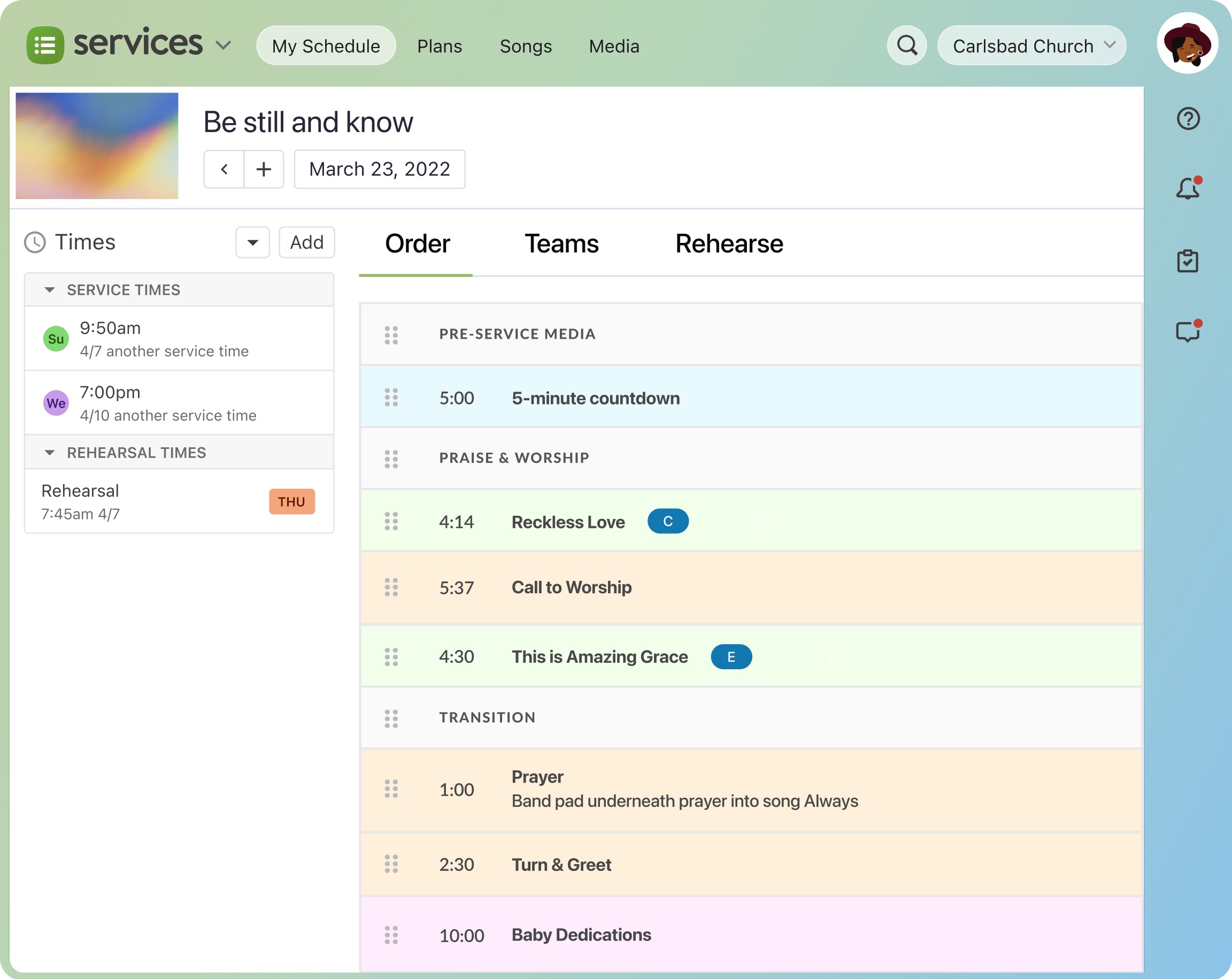
Planning Center is the de-facto industry standard, and the reason it works is also why it's frustrating: it's modular. Each product — Services, People, Giving, Check-Ins, Groups, Calendar, Publishing, Registrations — is sold and priced separately, and they share one login but feel like seven different apps.²
That design choice is what makes Services the gold standard for worship planning, and it's also why your monthly bill creeps past $250 before you've added accounting, a website, or a streaming service.¹ After fifteen years of running it ourselves and watching churches migrate onto and off it, we still think it's the safe pick for most growing churches over 150 people.³ We just want you to go in knowing what you're buying.
What it is
Planning Center is a suite of seven church operations products built by Planning Center Online, a Carlsbad, California company founded in 2006.² The flagship product is Services, a worship-planning and volunteer-scheduling tool that became dominant by being meaningfully better than anything else aimed at music directors. The rest of the suite — People (the database), Giving (donations), Check-Ins (kids and events), Groups (small groups), Calendar (room and resource booking), Publishing (the Church Center app), and Registrations (events) — was built or acquired around it.²
The modularity is the entire product strategy. You sign up for Services first because your worship pastor demanded it, then your kids director adds Check-Ins, then someone notices the database is empty and turns on People. Each module has its own free tier and its own paid pricing that scales by either people count or volume. There is no single bundle price; the bill is the sum of the parts.
Planning Center deliberately does not sell accounting, a website builder, or live streaming. Those omissions are not oversights — the company has been clear that they would rather do fewer things well than chase parity with all-in-one suites. In practice, that means almost every Planning Center customer is also paying QuickBooks or Aplos for accounting, and either Squarespace, Subsplash, or a custom site for their web presence.
Who it’s for
Planning Center is the right call for mid-size and multi-site churches with a real weekly worship rotation, a kids ministry that needs check-in, and at least one staff member comfortable navigating a SaaS dashboard. The sweet spot is roughly 150 to 2,500 weekly attendance. Below 100 people, you'll pay for capability you won't use and the modular UX will feel like overkill against Breeze. Above 3,000, especially multi-site, you'll start running into reporting limits and likely consider Pushpay's CCB or Rock RMS for deeper customization.
Denominational fit is broad — we see it equally at non-denominational, Baptist, Methodist, and Anglican churches — but it skews toward churches with contemporary worship and an active volunteer culture. If your services are liturgical and your volunteer base is small and stable, Services is overkill and you can probably stay on a simpler ChMS. If you're a teaching-driven church with a weekly band rotation and a kids check-in line on Sunday morning, this is what you want.
Key features
The flagship module. Build service plans, attach chord charts and rehearsal mp3s, schedule volunteers with conflict detection, and let team members accept or decline from the Services mobile app. Nothing else in the category is close.
A polished, white-labeled member-facing app that surfaces giving, group sign-ups, event registration, and check-in from one entry point. Included once you're on Publishing, and the main reason members will tolerate a new login.
Each product is priced separately, starting around $14/month per module and scaling with people count. You can run People for free and only pay for the tools you actually need, which is rare in this category.
Label printing, security codes, and station-based check-in that holds up under Sunday-morning load. Pairs with People for child-protection and allergy data.
The most thorough public API of any mainstream ChMS. Churches with a developer routinely build custom dashboards and integrations against it; Zapier coverage is also broad.
Almost no Planning Center customer pays for implementation. The data import wizards, in-app help, and documentation are good enough that most churches go live in a weekend.
ACH at 1%, cards at 2.15% + $0.30, with recurring giving and donor portals. Cheaper per transaction than Pushpay or Subsplash, though slightly more expensive than Tithe.ly's free plan at low volume.
Pros & cons
- Modular pricing means you only pay for the products you actually use, instead of bundling features you'll never touch.
- Services module is genuinely the gold standard for worship planning, with chord charts, rehearsal recordings, and conflict-aware scheduling.
- Church Center mobile app gives members one polished entry point for giving, groups, events, and check-in.
- Strong API and webhook coverage make it the easiest ChMS to integrate with custom tooling or third-party reporting.
- Onboarding is self-serve and well-documented; most churches go live without a paid implementation contract.
- Costs add up fast once you adopt 4-5 modules; a 500-person church can easily spend $250+/month before processing fees.
- No native general-ledger accounting, so finance teams still need QuickBooks or another system alongside it.
- Reporting across modules is inconsistent; some products have rich filters, others feel like an afterthought.
- The product suite still feels like separate apps stitched together, which means navigating between Services, People, and Giving has friction.
- No website builder, so churches needing a CMS have to pair it with Squarespace, Subsplash, or similar.
Pricing
Planning Center publishes pricing transparently for every module, which is unusual in this category.¹ Each product has a free tier with meaningful limits (Services free is unlimited users with limited plans per month; People free caps at 250 people; Giving has no monthly fee at all).¹ Paid plans start around $14/month per module and step up by people count, so the bill is a function of how many products you adopt and how many people you have.
In practice, a typical 300-person church running Services, People, Check-Ins, Groups, and Giving lands around $150-200/month. A 1,000-person church running the same five modules is closer to $250-350/month. Add Calendar and Registrations and budget another $50-100. The math changes fast once you cross people-count tiers, so the pricing page is worth checking against your active record count before you commit.
| Plan | Price | Includes |
|---|---|---|
| Free | $0/month | Limited per-product caps; usable for very small churches across most modules. |
| Per-product paid | $14/month | Each module priced separately starting around $14/mo, scaling with people count. |
| Bundle (typical mid-size) | $199/month | Most churches running 4-5 modules land in the $150-300/mo range. |
Transaction fees: 2.15% + $0.30 (ACH 1%) via Planning Center Giving
Alternatives
Flat-fee, simple ChMS that wins on pricing transparency for small and mid-size churches.
Enterprise-grade giving and ChMS suite aimed squarely at large multi-campus churches.
Mature, accounting-grade ChMS from a legacy vendor, strongest for churches that need real general ledger.
Verdict
We'd recommend Planning Center for any church with 100 or more weekly attendees that has a real volunteer rotation and a kids ministry on Sunday morning. Services is the best worship-planning and scheduling tool in the category, the API and integration story is unmatched, and the modular pricing means you genuinely only pay for what you use. For most churches in that size band, this is the safe and correct pick.
Skip it if you're under 50 people on a tight budget — Breeze costs less and is simpler to run. Skip it if your finance team needs real fund accounting in the same tool — Realm or ChurchTrac will serve you better. And skip it if you want a single bundled bill from one vendor with a website and an app included — Subsplash One or Tithe.ly's All-Access bundle are closer to that shape, even if they trade off depth in the modules. Otherwise, Planning Center is the floor we measure other ChMS tools against, and it has earned that position.
Sources
- Planning Center pricing pages, accessed 2026-05
- Planning Center company and product overview
- Wisefig internal testing notes (hands-on)