Rock RMS review: is it worth it in 2026?
By Sankalp Jonna · Last reviewed April 2026
Rock RMS
Free, open-source enterprise ChMS originally built for Central Christian Church and now used by megachurches.
Visit Rock RMS ↗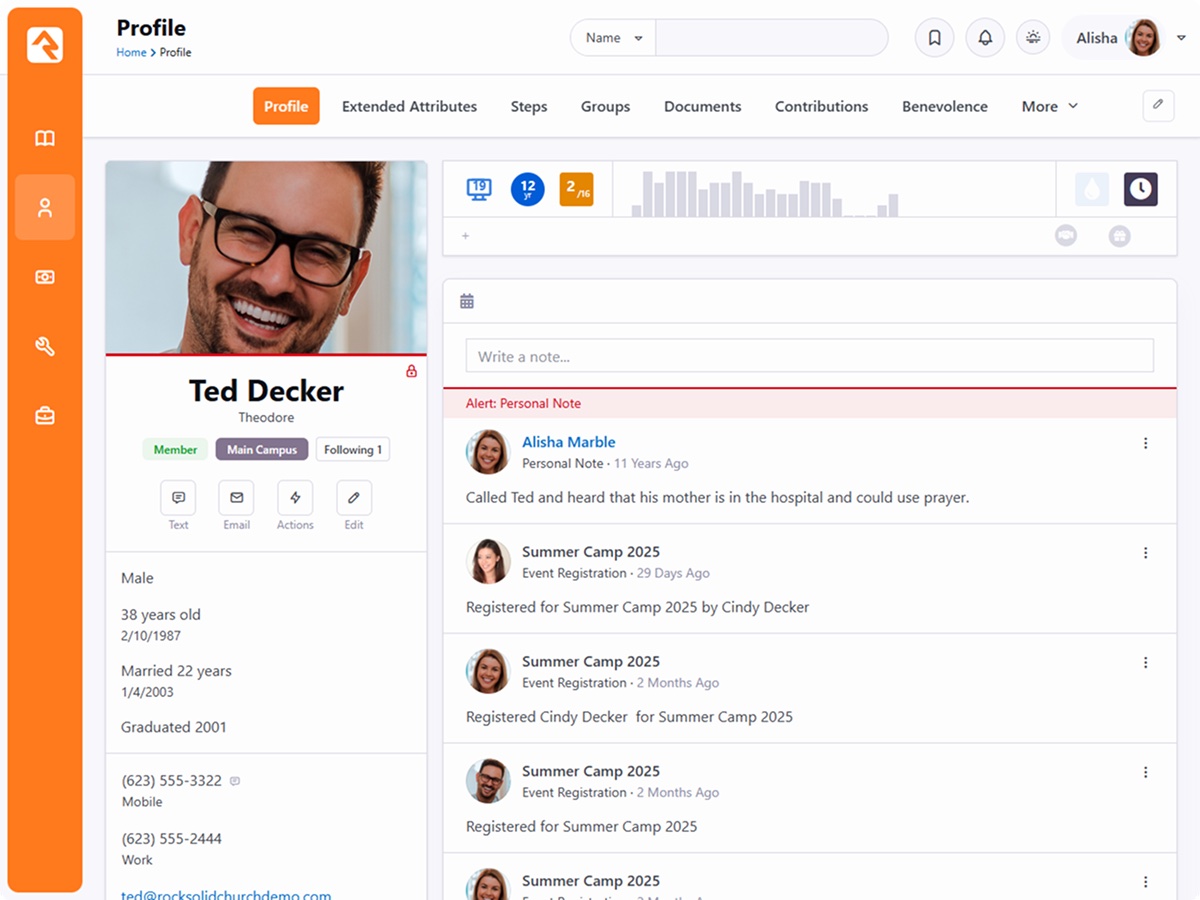
Rock RMS is the most interesting tool in this list because it's the only one whose ceiling is set by your team, not the vendor. The software is genuinely free and open source.¹ The workflow and rules engine is the deepest in the entire ChMS category by a wide margin. It was originally built for Central Christian Church in Mesa, Arizona, a 25,000-attendance multi-site, which is why the data model handles complexity that breaks commercial products.²
The catch is that 'free' here means free of license fees, not free of cost. Real implementations spend $5,000 to $20,000 on a partner to deploy and customize Rock, plus ongoing hosting and developer time.⁴ We've seen 10,000-attendance churches run operations on Rock that would cost $50,000/year on commercial alternatives. We've also seen 300-person churches drown in it. The right question isn't 'is Rock good', it's 'do we have a developer.'
What it is
Rock RMS is an open-source church management system developed by Spark Development Network, a non-profit organization based in Mesa, Arizona.² The project launched in 2013 as an internal tool at Central Christian Church and was released to the broader church community shortly after.² It is licensed under the Rock Community License, a permissive license that allows free use, modification, and self-hosting with no per-record fees, no per-user fees, and no commercial contract.¹
The software covers the full ChMS surface: a member database with arbitrarily extensible attributes, giving (with multiple processor integrations including Pi/MyWell and NMI), check-in for kids and events, attendance, groups, volunteer scheduling, communication (email and SMS), event registration, and a workflow engine that lets staff build automations Rock didn't ship with. There's also an integrated CMS — your church website and ChMS share the same user database without a sync layer.
The workflow engine deserves special attention. Most commercial ChMS products let you trigger emails or basic actions on events. Rock's engine lets you build multi-step workflows with conditional branching, approvals, data transformations, and external API calls. For a church with weird processes — and every large church has weird processes — this is the difference between forcing your operations to fit the software and shaping the software to your operations.
What Rock does not do well is be self-serve. Documentation has improved, but it assumes more technical comfort than commercial ChMS docs. Most churches deploy Rock through a partner — Spark Development Network itself, BEMA, or a handful of others — who handle hosting, customization, and ongoing support for $200-600/month plus implementation fees. Mobile experience trails commercial competitors unless you pay for the optional mobile shell.
Who it’s for
Rock RMS is for multi-site churches with internal IT capacity who want to own their data and customize beyond off-the-shelf limits. The classic buyer is a 1,500+ attendance church with a part-time or full-time developer on staff, a frustration with commercial ChMS reporting limits, and operations complex enough that 'fit the workflow to the tool' is no longer acceptable. We see Rock at large non-denominational churches, multi-site networks, and church-planting organizations.
It's not the right pick if you don't have a developer, budget for one, or stomach for managing your own infrastructure. We've seen 300-person churches choose Rock because the no-license-fee pitch was attractive, then spend $15,000 with a consultant trying to deploy it, then revert to Planning Center two years later. That's not Rock's fault — it's a tool for a specific buyer profile, and small churches without technical capacity are not it. If 'do we have a developer' answers no, choose something else and be honest about why.
Key features
Software is free under the Rock Community License. No per-record pricing, no contract, no vendor lock-in. Your only direct software cost is hosting and any partner services you choose to use.
The deepest workflow and rules engine in the ChMS category by a wide margin. Multi-step workflows with conditional branching, approvals, data transformations, and external API calls. The reason large churches choose Rock.
The Rock CMS and the ChMS share one user database. Your website, member portal, and back office are one system without sync hacks. Uncommon outside of large custom builds.
Built by and for a 25,000-attendance multi-site church, so the data model handles campus permissions, cross-campus reporting, and complex hierarchies that break commercial products.
Spark Development Network, BEMA, and other Rock partners offer hosted Rock at roughly $200-600/month all-in. The right choice for churches that want Rock's capability without managing their own server.
Not a feature, a fact. Rock requires a developer-adjacent staff member or a partner to deploy and maintain. This is not self-serve and won't be.
Integrates with Pi/MyWell, NMI, and other processors — you choose your own giving rail rather than being locked into the platform's. Useful for churches that want to shop processing rates independently.
Pros & cons
- Genuinely free and open source — no per-record pricing, no contract, no vendor lock-in.
- The workflow and rules engine is the most powerful in the entire ChMS market by a wide margin.
- Includes an integrated CMS, so your website and ChMS share one user database without sync hacks.
- Built by and for very large churches, so the data model handles multi-site, multi-campus, and complex permissioning.
- Active community of partners who provide hosting, customization, and consulting at fair rates.
- Real implementation cost is not zero — most churches spend $5-20k on a partner to deploy and customize it.
- Requires a developer-adjacent staff member or budget for one; this is not self-serve.
- Documentation is improving but assumes more technical comfort than commercial ChMS docs.
- Mobile experience trails commercial competitors unless you pay for the optional mobile shell.
- Roadmap is community-driven, so feature priorities won't always match yours.
Pricing
Rock's pricing is the most unusual in this list because the software itself is free.¹ Self-hosted, you pay only for your own server (typically $50-200/month on AWS or Azure for a mid-size church), developer time, and any third-party processors you integrate with. There is no per-record fee, no user license, and no contract.
Real-world total cost of ownership is meaningfully higher than the $0 software fee suggests. Implementation through a partner typically runs $5,000-20,000 depending on scope and migration complexity.⁴ Ongoing partner-hosted plans are $200-600/month all-in. Internal developer time, even part-time, is the largest cost most Rock churches end up bearing, and the one that's hardest to forecast in the first year. Rock is genuinely the cheapest tool in this list for churches at scale with the technical capacity to run it. It's the most expensive tool in this list for churches without that capacity, even though the software is free.
| Plan | Price | Includes |
|---|---|---|
| Self-hosted | $0/month | Free software; cost is your own server, dev time, and any third-party processors. |
| Partner-hosted | $200/month | Hosted by a Rock partner like SparkDevNetwork or BEMA; typically $200-600/mo all-in. |
Transaction fees: Depends on chosen processor (Pi/MyWell, NMI, etc.)
Alternatives
The modular industry standard for service planning, volunteer scheduling, and people management.
Enterprise-grade giving and ChMS suite aimed squarely at large multi-campus churches.
Legacy enterprise ChMS with a newer F1Go cloud product, still common at large institutional churches.
Verdict
We'd recommend Rock RMS for multi-site churches above roughly 1,500 weekly attendance with internal IT capacity or a real partner relationship lined up. At that scale, the workflow engine, integrated CMS, and absence of per-record licensing are real advantages over Planning Center or Pushpay/CCB. We've seen large churches save tens of thousands of dollars per year and end up with operations that are genuinely tailored to how their staff actually works.
Skip Rock if you don't have a developer or aren't ready to commit budget to one. The 'free' label is the most misleading part of the story for the wrong buyer — total cost of ownership for a small church without technical capacity will be higher than just paying Planning Center or Breeze. If you're below 800 people or your IT plan is 'maybe we can find someone in the congregation,' that's a no. Rock rewards technical investment, and it punishes churches that try to deploy it without that investment in place.
Sources
- Rock RMS licensing and pricing page, accessed 2026-05
- Rock RMS project background and Spark Development Network
- Rock RMS workflow engine and product overview
- Wisefig internal testing notes (hands-on)